개발자라면 어느날 갑자기 Github으로부터 메일을 한 통 받게 됩니다.
Hi @anonymous,
You recently used a password to access the repository at anonymous/SecretProject with git using git/2.29.0.
Basic authentication using a password to Git is deprecated and will soon no longer work. Visit https://github.blog/2020-12-15-token-authentication-requirements-for-git-operations/ for more information around suggested workarounds and removal dates.
Thanks,
The GitHub Team
git CLI 명령을 이용해서 패스워드 인증을 하고 있었는데 조만간(올해 8월부터는) 기본 인증(패스워드 인증)이 deprecate되어 더 이상 사용할 수 없다는 내용입니다. 물론 Github Enterprise에는 해당하지 않고 public Github에 우선 적용됩니다.
개인 접근 토큰 생성하기
이제는 기본 인증 대신에 개인 접근 토큰(personal access token)을 사용해야 합니다.
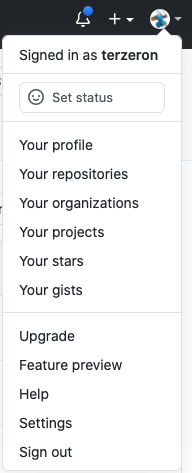
github 홈페이지의 계정 풀다운 메뉴를 펼쳐서 Settings 메뉴 항목을 선택합니다.
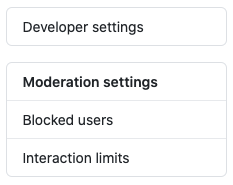
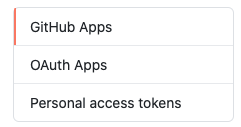
좌측 메뉴 리스트 하단의 Developer settings 메뉴 > Personal access tokens 메뉴로 진입합니다.
"Generate new token" 버튼을 클릭하고 개인 접근 토큰을 생성합니다. 간단한 설명을 적고 repo와 workflow, git 항목 정도에 체크를 한 다음 "Generate token" 버튼을 클릭하면 생성되는데, 이 때 생성되는 토큰값을 분실하면 재생성해야 하니 어딘가에 복사해둘 필요가 있습니다.
접근 토큰 저장하는 설정하기
우선, 패스워드 대신 접근 토큰을 사용하는 경우 credential(계정+패스워드 or 토큰)을 cache하는 게 정상적으로 동작하지 않아서 부득이하게 store 전략을 선택해야 합니다. store는 단순히 파일에 credential을 저장해두는 것이기 때문에 보안상 취약합니다.
git config --global credential.helper 'store --file ~/.git-credentials'
macOS의 경우에는 osxkeychain을 helper로 지정하는 게 좋습니다.
git config --global credential.helper osxkeychain
접근 토큰을 패스워드로 등록하기
기본 remote 저장소가 origin이고 기본 브랜치가 master라고 가정합니다.
저장소 url을 변수에 담아 둔 다음에 remote를 제거했다가 다시 추가하는 방법을 이용합니다.
push는 최초 한 번은 origin/master를 기본 upstream 브랜치로 설정해줘야 합니다.
시작하기 전에 pull을 해서 remote와 working directory를 맞춰주는 게 좋습니다.
git pull && \\
origin=$(git remote -v | head -1 | cut -f2 | cut -d' ' -f1) && \\
git remote remove origin && \\
git remote add origin $origin && \\
git push --set-upstream origin master
bash
마지막 push 실행 단계에서 계정과 패스워드를 입력하라고 요구받는데, 이 때 계정과 아까 생성해두었던 개인 접근 토큰을 패스워드 대신에 입력하면 됩니다.
트러블슈팅
pull이 잘 안 되는 경우, 다음과 같이 upstream 브랜치를 설정해줘야 합니다.
git pull
git branch --set-upstream-to=origin/master master
git pull
push할 때마다 계정과 패스워드를 요구받는다면 credential 보관 설정에 문제가 있는 것이니 설정을 확인하는 게 좋습니다.
(생각난 김에) 추가 보안 강화하기
git CLI와 직접적인 관련은 없지만, 2 factor 인증을 설정하면 Github 계정을 더 안전하게 보호할 수 있습니다.
아래 문서에 따라 설정을 활성화하면 Google Authenticator 모바일앱을 이용할 수 있습니다.
https://docs.github.com/en/github/authenticating-to-github/configuring-two-factor-authentication