역사
IO: Java 1.0
NIO: Java 1.4
NIO.2: Java 1.7
IO -> NIO
NIO -> NIO.2
NIO
- JSR 51 adopted in JDK 1.4
- 일반적인 IO API
packages
- java.nio
- java.nio.channels
- java.nio.charset
NIO.2
- as an OpenJDK project
- 3 primary elements
- extensive File I/O API
- socket channel API -> multicasting, socket binding with channel
- asynchronous I/O API -> scalability
packages
- java.nio.file 추가
- java.nio.file.attribute
- java.nio.file.spi
목표
- 기존 File API의 문제점
- IO 예외처리가 부족하여 종종 crash하기도 했음
- Linux와 Windows가 다르게 동작하기도 함
- 동시에 메타데이터를 얻는 메소드 부족
- 풍부한 메타데이터를 활용 희망
- 자체적인 파일시스템 구현체 사용 희망
- 메모리 기반 유사 파일시스템
- Zip 파일 포맷 파일시스템
Path class
- java.nio.file의 Path class
- java.io의 File class와 유사함
BufferReader reader = Files.newBufferedReader(path, StandardCharsets.UTF_8);
- Path란 file을 가리키는 (시스템 의존적인) 경로
- 새로운 delete() method는 예외를 발생시킴
- 두 가지 유형의 operation
- path 조작, path 요소 추출, path에 대한 iteration
- create/open/delete a file, create a directory, ...
Path 예제
Path p = Paths.get(HOME);
Files.exists(p);
Files.isRegularFile(p);
Files.isReadable(p);
Path p = Paths.get(HOME + "/" + fileName);
Files.createFile(p);
Files.delete(p);
Path p = Paths.get(HOME + "/" + dirName);
Files.createDirectory(p);
Files.delete(dir);
Files.createDirectory(dir1);
Files.createDirectory(dir2);
Path file1 = dir1.resolve("filetocopy.txt");
Path file2 = dir2.resolve("filetocopy.txt");
Files.createFile(file1);
Files.copy(file1, file2);
Path p = Paths.get("/articles/baeldung/logs");
p.toString();
Path fileName = p.getFileName();
Path name0 = p.getName(0);
Path name1 = p.getName(1);
Path name2 = p.getName(2);
Path p1 = Paths.get("/articles/baeldung/logs");
Path p2 = Paths.get("/articles/baeldung");
Path parent1 = p1.getParent();
Path parent2 = p2.getParent();
Path root1 = p1.getRoot();
Path root2 = p2.getRoot();
Path p = Paths.get("/home/./baeldung/articles");
Path cleanPath = p.normalize();
Path p = Paths.get("/baeldung/articles");
Path p2 = p.resolve("java");
Directory
- IO
- java.io.File.list(), java.io.File.listFiles()의 문제점
- 대규모 디렉토리에서 list를 수행하면 hang 발생함
- 동시성도 제공되지 않아서 OOME 발생함
- NIO.2
- 디렉토리는 iterator 형태로 사용하는 stream 객체
- 디렉토리 내부의 파일 이름은 byte sequence 형태로 보관됨
- 이름으로 필터링 가능(regex, glob pattern)
Directory 예제
Set<String> fileList = new HashSet<>();
try (DirectoryStream<Path> stream = Files.newDirectoryStream(Paths.get(dir))) {
for (Path path : stream) {
if (!Files.isDirectory(path)) {
fileList.add(path.getFileName().toString());
}
}
}
- DirectoryStream은 Java 8의 Stream과는 관련없음
- Java 8의 Stream 활용
try (Stream stream = Files.list(Paths.get(dir))) {
return stream
.filter(file -> !Files.isDirectory(file))
.map(Path::getFileName)
.map(Path::toString)
.collect(Collectors.toSet());
}
FileVisitor interface
- walkFileTree()
- 파일시스템을 tree 형태로 간주하고 traverse하는 수단
- recursive copy/move/delete/...
- 에러 케이스 대응
- FileVisitResult visitFileFailed()
- preVisitDirectory()
- postVisitDirectory()
SimpleFileVisitor 예제
public static class PrintFiles extends SimpleFileVisitor<Path> {
@Override
public FileVisitResult visitFile(Path file, BasicFileAttributes attr) {
if (attr.isSymbolicLink()) {
System.out.format("Symbolic link: %s ", file);
} else if (attr.isRegularFile()) {
System.out.format("Regular file: %s ", file);
} else {
System.out.format("Other: %s ", file);
}
System.out.println("(" + attr.size() + "bytes)");
return CONTINUE;
}
@Override
public FileVisitResult postVisitDirectory(Path dir, IOException exc) {
System.out.format("Directory: %s%n", dir);
return CONTINUE;
}
@Override
public FileVisitResult visitFileFailed(Path file, IOException exc) {
System.err.println(exc);
return CONTINUE;
}
}
Symbolic Link
- 일부 파일시스템은 symbolic link(soft link) 기능을 제공함
- link는 대상 파일시스템 객체를 투명하게 가리키는 역할
- link에 접근하면 대상 객체인 것처럼 보임
- 그러나 삭제나 이름변경은 대상 객체가 아니라 link에 영향을 끼침
- NIO.2 java.nio.file에서야 드디어 POSIX symbolic link를 완벽 지원
- Linux, Unix, Windows Vista, ...
- circular references에 의한 loop를 보고함
WatchService
- file change notification
- 사용방법
- WatchService를 생성
- event를 등록
- event를 받아내서 정보를 활용함
- event 초기화
WatchService 예제 및 실습
public static void main(String[] args) {
WatchService watcher = FileSystems.getDefault().newWatchService();
Path dir = FileSystems.getDefault().getPath("/usr/karianna");
WatchKey key = dir.register(watcher, ENTRY_MODIFY, ENTRY_CREATE);
while (true) {
key = watcher.take();
for (WatchEvent<?> event : key.pollEvents()) {
}
key.reset();
}
}
Security Models
- POSIX file permission
- Access Control List
- ACL component: 권한 허용 여부
- principal component: group or user
- permissions component: POSIX permission
- flags component: 상속이나 전파 방법
java.nio.file.attribute
file attribute 예제
Path home = Paths.get("/Users/myid");
BasicFileAttributeView basicView = Files.getFileAttributeView(home, BasicFileAttributeView.class);
BasicFileAttributes basicAttribs = basicView.readAttributes();
long size = basicAttribs.size();
boolean isDir = basicAttribs.isDirectory();
boolean isFile = basicAttribs.isRegularFile();
boolean isSymLink = basicAttribs.isSymbolicLink();
boolean isOther = basicAttribs.isOther();
FileTime created = basicAttribs.creationTime();
FileTime modified = basicAttribs.lastModifiedTime();
FileTime accessed = basicAttribs.lastAccessTime();
file space attribute 예제
Path file = Paths.get("file");
FileStore store = Files.getFileStore(file);
long total = store.getTotalSpace();
long used = store.getTotalSpace() - store.getUnallocatedSpace();
Iterable<FileStore> fileStores = FileSystems.getDefault().getFileStores();
for (FileStore fileStore : fileStores) {
long totalSpace = fileStore.getTotalSpace();
long unAllocated = fileStore.getUnallocatedSpace();
long usable = fileStore.getUsableSpace();
}
file owner attribute 예제
Path path = Paths.get(HOME);
FileOwnerAttributeView ownerView = Files.getFileAttributeView(attribPath, FileOwnerAttributeView.class);
UserPrincipal owner = ownerView.getOwner();
String ownerName = owner.toString();
user defined file attribute 예제
Path path = Paths.get("somefile");
UserDefinedFileAttributeView userDefView = Files.getFileAttributeView(attribPath, UserDefinedFileAttributeView.class);
List<String> attribList = userDefView.list();
String name = "attrName";
String value = "attrValue";
userDefView.write(name, Charset.defaultCharset().encode(value));
ByteBuffer attrValue = ByteBuffer.allocate(userView.size(attrName));
userDefView.read(attribName, attribValue);
attrValue.flip();
String attrValue = Charset.defaultCharset().decode(attrValue).toString();
userDefView.delete(attrName);
java.nio.file.spi
- 새로운 파일시스템을 제공하려는 경우에 사용하는 service provider interface
Asynchronous IO
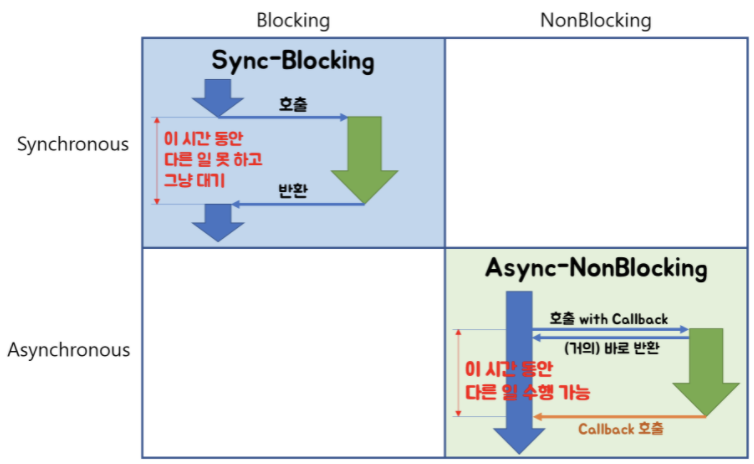
- blocking vs nonblocking
- IO operation이 return할 때까지 기다릴지의 여부
- blocking은 무조건 대기
- synchronous vs asynchronous
- main thread가 처리하는지, callback이 처리할지
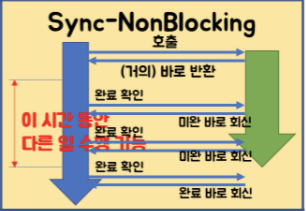
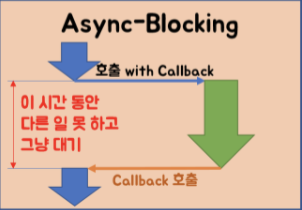
4가지 IO 모델
- synchronous blocking IO
- synchronous nonblocking IO
- asynchronous blocking IO
- with callback, with blocking
- asynchronous nonblocking IO
- with callback, without blocking
1, 4
2
3
asynchronous socket channel 도입
- NIO에 있던 SocketChannel, ServerSocketChannel, FileChannel class에 Asynchronous prefix 붙은 class 제공
- Future나 CompletionHandler를 이용하여 return값 처리
Future 방식의 예제
AsynchronousServerSocketChannel server = AsynchronousServerSocketChannel.open().bind(null);
Future<AsynchronousSocketChannel> future = server.accept();
future.isDone();
future.isCancelled();
future.cancel(true);
AsynchronousSocketChannel client= future.get();
CompletionHandler 방식의 예제
AsynchronousServerSocketChannel listener = AsynchronousServerSocketChannel.open().bind(null);
listener.accept(attachment, new CompletionHandler<AsynchronousSocketChannel, Object>() {
public void completed(AsynchronousSocketChannel client, Object attachment) {
}
public void failed(Throwable exc, Object attachment) {
}
});
참고자료