JDK9부터는 reflection에 대한 경고가 발생함
WARNING: An illegal reflective access operation has occurred
WARNING: Illegal reflective access by org.powermock.reflect.internal.WhiteboxImpl (file:/Users/terzeron/.m2/repository/org/powermock/powermock-reflect/2.0.0/powermock-reflect-2.0.0.jar) to method java.lang.Object.clone()
WARNING: Please consider reporting this to the maintainers of org.powermock.reflect.internal.WhiteboxImpl
WARNING: Use --illegal-access=warn to enable warnings of further illegal reflective access operations
WARNING: All illegal access operations will be denied in a future release
Java Runtime
이런 경고 메시지를 피하려면 컴파일 할 때 다음과 같은 옵션을 주면 해결된다.
java --illegal-access=permit
IntelliJ
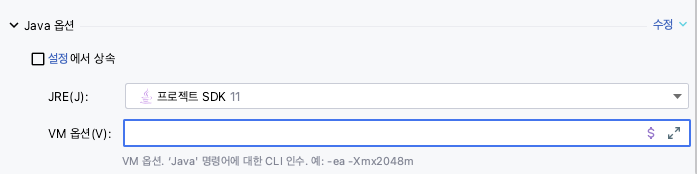
IntelliJ를 사용할 경우, Run Configuration에서 이 옵션을 미리 등록해두는 방법이 있다.
Jar Application이나 Junit, Maven을 이용한 Run Configuration을 생성하면 대부분 VM 옵션을 지정할 수 있는 입력창이 존재하는데, 여기에 입력하면 된다.
Jar Application Run Configuration

JUnit Run Configuration

Maven Run Configuration
Maven
maven을 사용하는 경우에는 어떤 lifecycle에서 어떤 plugin이 사용되는지를 알아야 한다.
주로 mock test와 관련된 라이브러리가 reflection에 의존하기 때문에 발생한다고 가정할 수 있는데, 그런 경우 surefire(단위 테스트)나 failsafe(통합 테스트) 플러그인에 argument를 추가하면 해결된다.
<plugin>
  <groupId>org.apache.maven.plugins</groupId>
  <artifactId>maven-surefire-plugin</artifactId>
  <version>2.22.0</version>
  <configuration>
    <argLine>--illegal-access=permit</argLine>
  </configuration>
</plugin>

<plugin>
  <groupId>org.apache.maven.plugins</groupId>
  <artifactId> maven-failsafe-plugin</artifactId>
  <version>2.22.0</version>
  <configuration>
    <argLine>--illegal-access=permit</argLine>
  </configuration>
</plugin>
참고자료
https://www.logicbig.com/tutorials/core-java-tutorial/modules/illegal-access-operations.html